If you already have a listing on the Airbnb platform and want to connect Hotel-Spider to sync availabilities, rates, restrictions and reservations, follow these steps:
(If you don't have a listing yet, see the article 'How do I sign up for Airbnb?' for more details on setting up your Airbnb account.)
- Identification:
Here is a step-by-step guide to connect Hotel-Spider to your existing Airbnb account:
1) In the Hotel-Spider Extranet, go to Interfaces -> CRS and select Airbnb as the connection.
https://extranet.hotel-spider.ch/hotel/#/bookingchannels
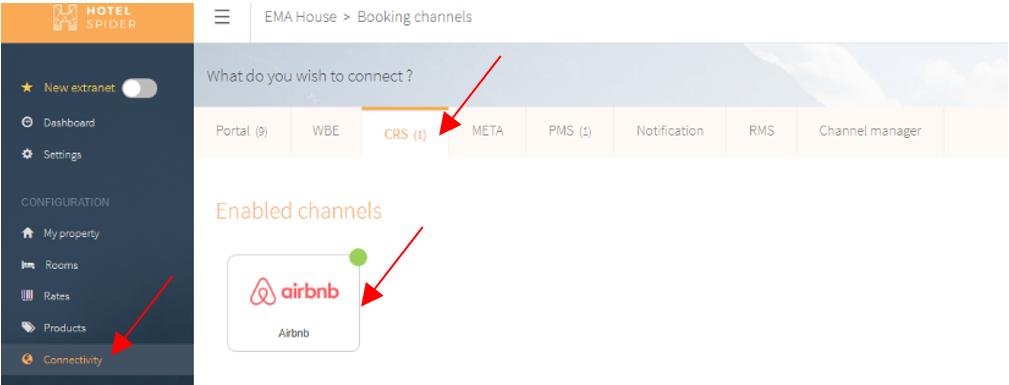
2) To identify yourself, click on "Connect Airbnb".

3) You will be automatically redirected to the Airbnb page to enable the connection. If you are already logged in to Airbnb, simply check the box and click "Allow". Otherwise, you still need to log in to your Airbnb account first.


- Mapping
The next step is to link the categories of Hotel-Spider with the listings of Airbnb. Do this in the "Mapping" tab by dragging and dropping the fields from the right column to the left side of the screen. When all products are mapped, click Save!

- Gateway settings:
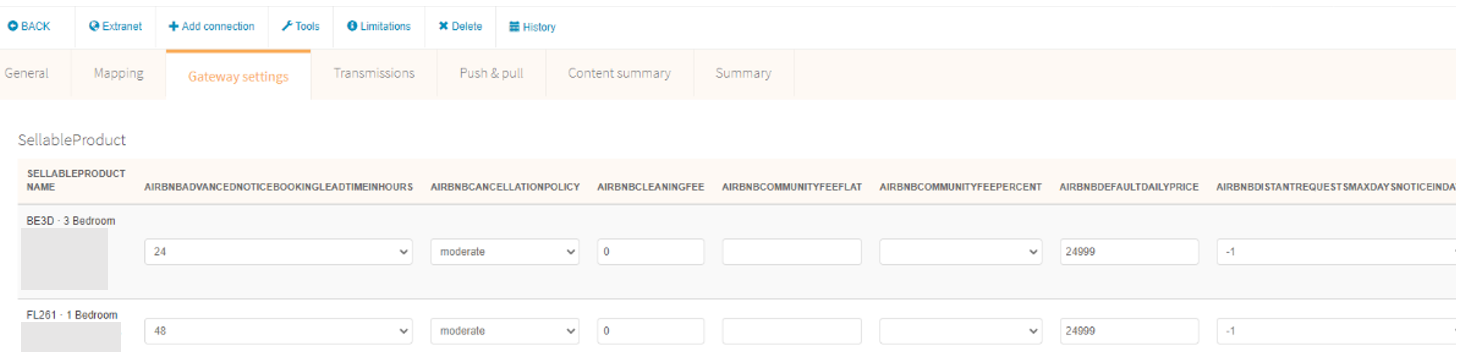
| Setting | Meaning | Relevance |
| Airbnb minimum time between the reservation and arrival |
= advance booking period - min. number of days
|
Only relevant if images and content are synchronized (Airbnb integration type = All) |
| Airbnb cancellation condition |
= scale set by Airbnb. More info can be found here: https://www.airbnb.de/home/cancellation_policies
|
Only relevant if images and content are synchronized (Airbnb integration type = All) |
| Final cleaning | = will be charged once | for all, provided that a fee applies |
| Airbnb Maximum time between booking and arrival Spider-Booking | = Advance booking period - max. number of days | Only relevant if images and content are synchronized (Airbnb integration type = All) |
| Airbnb default occupancy | = Number of persons, which is defined by Airbnb as the default for this listing. | for all |
| Airbnb price additional person | = Surcharge on standard occupancy for additional persons | for all |
| Publish listing | = enables / disables the visibility of the listing on Airbnb | for all |
| Airbnb Amount to be prepaid | = deposit, which must be paid after booking | for all, if deposit is required |
| Airbnb integration type |
Rates and availabilities = Hotel-Spider synchronizes availabilities, rates, restrictions and reservations All = Hotel-Spider synchronizes availabilities, prices, restrictions, reservations AND content (names, description, images, other gateway settings). |
ATTENTION: If you have already loaded room names, descriptions, pictures, etc. at Airbnb, make sure that "Rates and availabilities" is set here and not "All". If you set the sync to "All", all content already loaded on Airbnb will be overwritten! |
- Synchronisation of the data:
In the last step, the synchronization can be started under the item "Transfer and fetch".
Please check afterwards in the extranet of Airbnb if the data arrived correctly. Spot check some of the data and compare prices, availabilities and booking rules for all listings.
- Review and approval of listings by Airbnb .
After activating the interface, Airbnb will examine your listings for the prescribed requirements. If they are not met, Airbnb will ask you to adjust your listings before posting them online.
Comments
0 comments
Please sign in to leave a comment.