Making single use bookable on the HRS Extranet
At HRS there is only the possibility to activate the single use for the default category Double Room.
To do this, go to the HRS Extranet to the menu item DISCOUNTS and activate there the discount
DR to SR, enter the difference between double and single use:
Sending two occupancy prices per category
The system of HRS supports only day based prices, thus only one price per product.
If you have defined different occupancies in Hotel-Spider, nevertheless only one price can be accepted by HRS, per product* only the price of the default occupancy will be sent.
*Product=Room category and rate
.
Example:
For the derived rates, therefore, there is always a double-use rate and a single-use rate per room category on the HRS Extranet.
In Hotel-Spider we then receive two HRS mapping codes to connect:
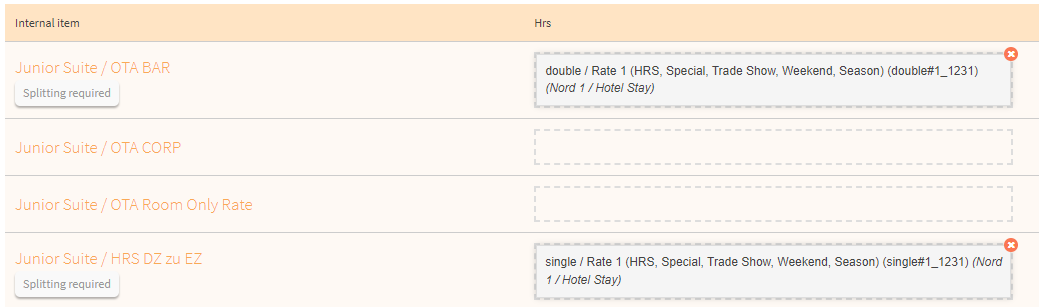
In order that two codes can be connected and their correct rates are sent, a further rate must be added in the Channel Manager. This can be called for example: "HRS: DR to SR".
(Or also "SR to DR" or similar variants, depending upon default allocation and allocations of the rooms)
For the connection with Hotel-Spider this means:
- A new rate needs to be created and linked as a product
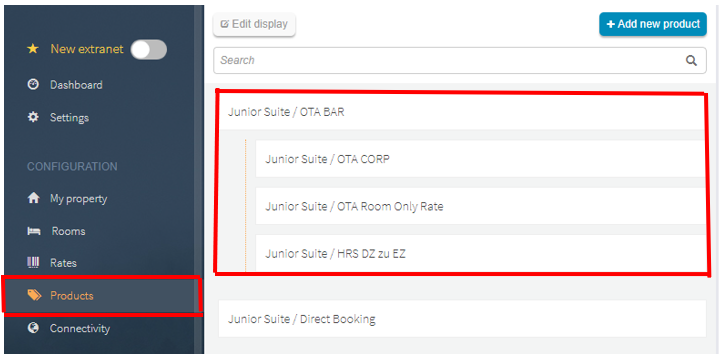
- What is our default occupancy for the room categories in question?
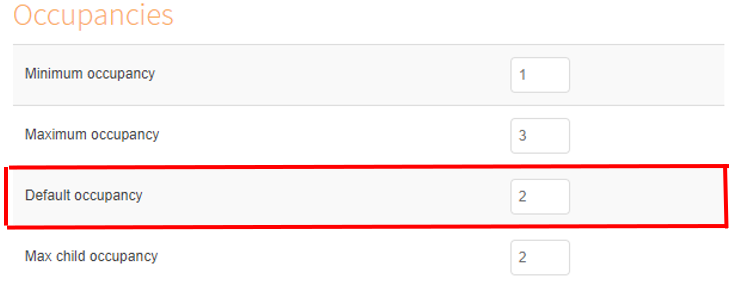
- The price must be added or subtracted accordingly
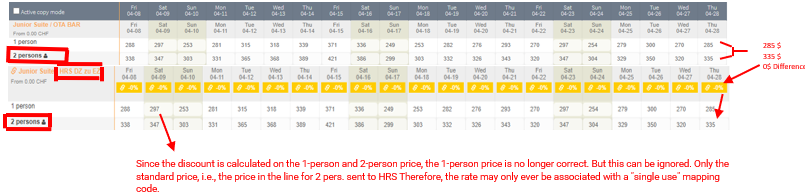
- In the derived products, the value of the difference between double and single occupancy must be entered: Set product derivatives (prices and booking rules)
- Under Interfaces -> HRS -> Mapping, the connection to the "single use" and "double use" rates must be created for the respective category
- Under Interfaces -> HRS, the splitting must take place after the mapping
For more detailed information, we have the following article: How do I define splitting? - Start a full data push under the "Transfer and Fetch" tab.
Comments
0 comments
Please sign in to leave a comment.